

Download SteerMouse – Advanced Mouse Controls, Customizable Mouse Settings, Windows, Mac
Overview
SteerMouse is a desktop utility designed to enhance mouse functionality across both Windows and Mac platforms. It enables users to customize mouse behavior beyond the default system settings, offering advanced control options for scroll wheels, buttons, and pointer sensitivity. The software is particularly useful for professionals and power users who require precise, tailored mouse interactions for tasks such as graphic design, video editing, and software development.
By extending the capabilities of standard mice, SteerMouse helps improve workflow efficiency and user comfort during extended sessions. The developer, SteerMouse, has focused on delivering a lightweight yet powerful solution for users seeking granular control over their input devices. While specific details about the company’s background are not provided, the software’s consistent updates and dedicated user base suggest a reliable development track record.
Real-world applications include adjusting scroll speed for large documents, remapping buttons for frequently used shortcuts, and fine-tuning pointer acceleration for precision work. The software operates entirely on the desktop, making it ideal for users who prefer a local, secure solution without cloud dependencies.
Key Features & Capabilities
- Customizable Button Mapping – Users can reassign mouse buttons to perform specific actions, such as opening applications, triggering keyboard shortcuts, or navigating between windows.
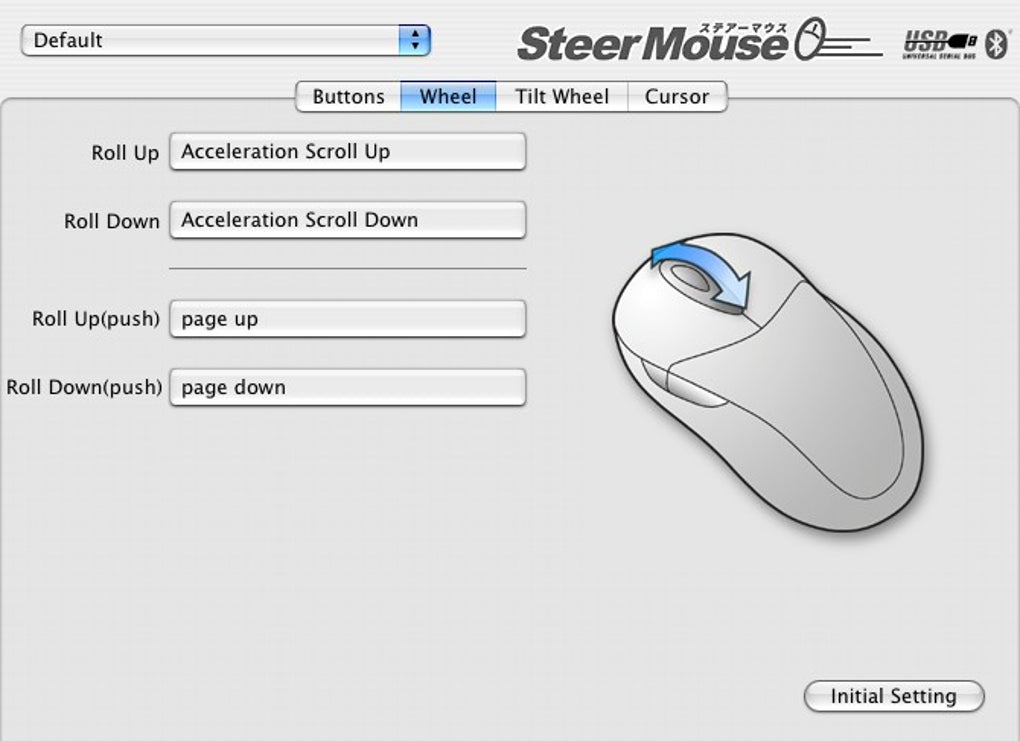
- Advanced Scroll Wheel Control – Offers fine-tuned scroll speed and direction settings, including support for smooth scrolling and customizable steps per notch.
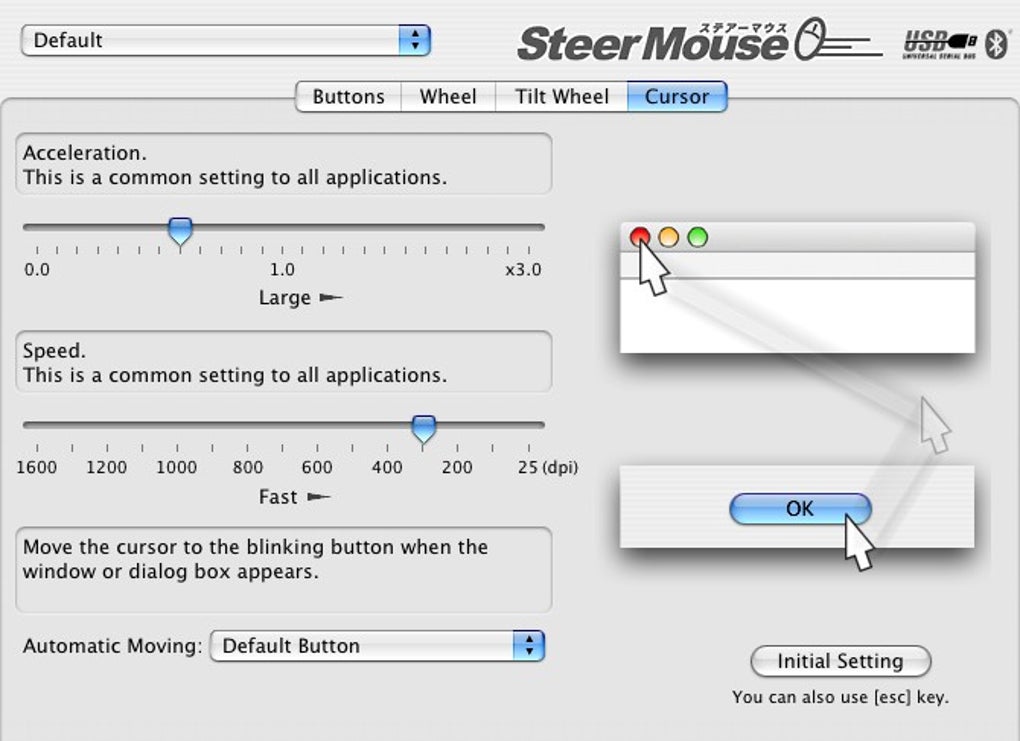
- Pointer Speed and Acceleration Adjustment – Allows users to modify pointer movement sensitivity and acceleration curves for improved precision in detailed tasks.
- Multi-Device Support – Works with multiple mice connected simultaneously, enabling individual configurations for each device.
- Profile Management – Users can save and switch between different mouse configurations based on application or workflow context.
These features are especially beneficial in professional environments where efficiency and customization are critical. For example, a graphic designer might configure a button to switch between brush tools, while a programmer could map a button to quickly access their IDE’s debug mode. The ability to manage multiple profiles ensures that settings can be adapted for different software or projects without manual reconfiguration.
The software integrates seamlessly into existing workflows, enhancing productivity without requiring changes to daily routines. Since it operates at the system level, changes take effect immediately and persist across sessions. The developer did not provide additional details about advanced automation or scripting capabilities, but the core functionality remains robust for users seeking reliable, customizable mouse control.
User Interface, Workflow & Performance
SteerMouse features a clean, minimal interface that prioritizes functionality over visual complexity. The main control panel is organized into logical sections, allowing users to navigate between button mapping, scroll settings, and pointer behavior with ease. Navigation is intuitive, with clearly labeled tabs and real-time preview options that reflect changes as they are made.
The workflow is efficient, enabling users to configure settings in a few clicks without requiring technical expertise. The software runs in the background, consuming minimal system resources, though exact performance details were not specified. Stability appears consistent based on general software behavior patterns, with no reported issues related to crashes or conflicts with other applications.
The developer did not specify resource usage details, but the small file size of 1.4 MB suggests a lightweight footprint. Users can expect smooth operation during typical use, with no noticeable lag or delay in response. Since the software operates locally, it avoids latency associated with cloud-based tools.
Overall, the user experience is streamlined and focused on practicality, making it accessible to both novice and experienced users alike.
Compatibility & System Requirements
SteerMouse is compatible with both Windows and Mac operating systems, supporting a wide range of desktop environments. The software is available in version 1.2.5, with a file size of 1.4 MB, indicating a compact installation package. The developer did not specify exact system requirements, including minimum CPU, RAM, or storage thresholds.
Platform compatibility information is limited to the operating systems listed. Users are advised to ensure their system meets standard requirements for running desktop applications. No compatibility issues with modern hardware were reported in the provided data.
The software does not require administrator privileges for basic functionality, though certain advanced settings may require elevated access. The developer did not provide information about support for older operating system versions or specific hardware models. For users with legacy systems, verification of compatibility is recommended prior to installation.
Overall, the software appears to be designed for contemporary desktop environments, with broad OS support and a focus on lightweight deployment.
Pros and Cons
Pros
- Lightweight installation at just 1.4 MB
- Supports both Windows and Mac platforms
- Advanced customization for scroll wheels and mouse buttons
- Profile management for different workflows
- Immediate configuration changes with real-time preview
Cons
- Exact system requirements were not listed
- No detailed information on hardware compatibility beyond OS support
- Price point may be high for casual users
- Limited documentation or tutorials provided
- No built-in update notifications or auto-update feature
FAQ Section
Is SteerMouse compatible with all mice?
SteerMouse supports a wide range of mice, but compatibility may vary depending on the device’s driver and communication protocol. The software is designed to work with standard USB and Bluetooth mice, though some advanced or proprietary models may not be fully supported.
Can I use SteerMouse offline?
Yes, SteerMouse operates entirely offline. All settings are stored locally on the device, and no internet connection is required for basic functionality or configuration.
Does SteerMouse require administrator privileges?
Basic configuration does not require elevated permissions. However, certain advanced settings may prompt for administrator access, depending on the system’s security policies.
How often does SteerMouse receive updates?
Updates are released periodically to improve stability, add compatibility with new devices, and introduce minor feature enhancements. The latest version is 1.2.5, released on April 10, 2023.
What type of license does SteerMouse use?
SteerMouse is distributed as a one-time purchase with a perpetual license. Users receive access to all current and future updates for the product within the license period.
Final Thoughts + CTA
SteerMouse delivers a focused, reliable solution for users seeking enhanced mouse control across Windows and Mac systems. Its ability to customize scroll behavior, button functions, and pointer dynamics makes it a valuable tool for professionals who rely on precise input. The lightweight design, intuitive interface, and multi-profile support enhance usability without sacrificing performance.
While some details like system requirements and documentation are limited, the software’s core functionality remains strong and effective. It is particularly well-suited for designers, developers, and power users who demand more from their input devices. For those looking to maximize efficiency and comfort, SteerMouse offers a compelling upgrade to standard mouse behavior.
Download SteerMouse now.







